



AllTrails difficulty ratings explained in one sentence: they’re relative, inconsistent across trail types, and calibrated to the average of all hikers who reviewed the trail, not the first-timer standing at the trailhead trying to figure out if they’ve made a terrible decision.
“Moderate” on AllTrails can mean a breezy 3-mile loop with 200 feet of gain. It can also mean a 6-mile ridge climb with 1,400 feet of elevation that humbles experienced hikers on the steep sections. Both get the same label. Neither comes with a footnote explaining which version you’re looking at.
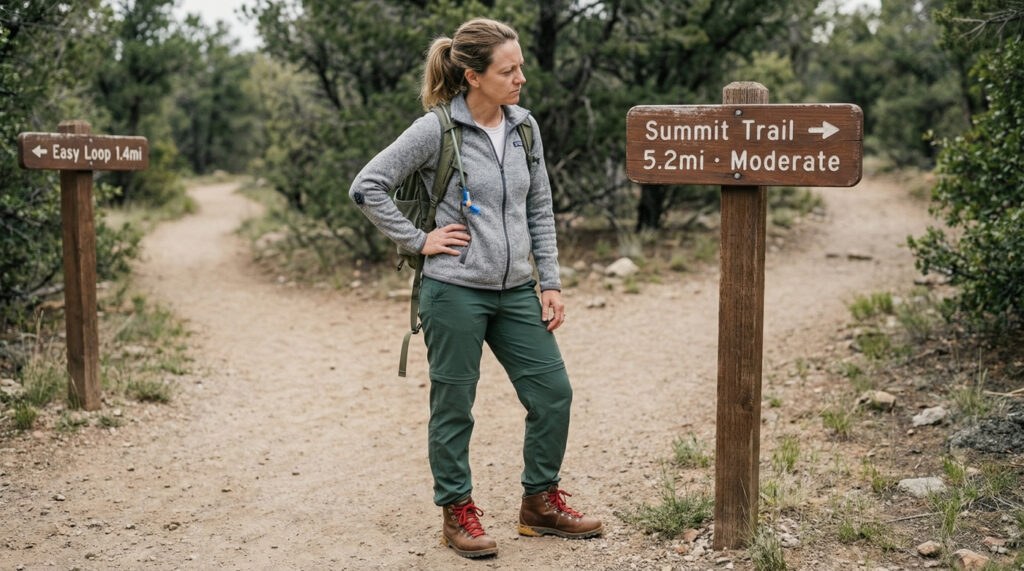
I found this out the hard way. My third hike, I picked a trail rated Moderate because I’d done two Easy trails and figured I was ready to step up. The app said 5.2 miles, which felt manageable. What the app didn’t say was that those 5.2 miles included 1,100 feet of gain packed almost entirely into the first two miles, a loose-rock section halfway up, and zero shade on a 78°F morning in May. I made it. I was not okay at the top. I sat next to a couple who were clearly regulars, eating sandwiches and looking completely relaxed, while I catalogued muscles I’d discovered for the first time.
The AllTrails difficulty ratings aren’t useless. But they’re not what most beginners think they are, either. This guide breaks down what Easy, Moderate, and Hard actually describe, how accurate is AllTrails difficulty in practice, and the three numbers that tell you far more than the label ever will. Our beginner hiking guide covers trail selection broadly. This one is specifically about reading AllTrails difficulty ratings explained from start to finish.
Table of Contents
Why AllTrails Difficulty Ratings Explained Don’t Mean What You Think
How AllTrails builds its ratings
AllTrails difficulty ratings are generated by a combination of two things: a base algorithm that factors in total distance and total elevation gain, and a crowd-sourced adjustment from user ratings and reviews. That second part matters more than most beginners realize.
The algorithm itself is reasonable. Distance and elevation are the two variables that most reliably predict how hard a trail feels. But the crowd-sourced layer averages ratings across every type of hiker who has reviewed the trail, including trail runners who cover it twice a week, retired park rangers who do this six days a week, and seasoned hikers who have been on every trail in the county. When those users rate a trail “Easy,” their Easy is not a first-timer’s Easy.
The result is a rating system that works reasonably well for experienced hikers and systematically underestimates difficulty for beginners. An AllTrails “Easy” is genuinely easy for most fit adults who hike regularly. For someone on their second or third outing, it may be a genuine challenge depending on the terrain.
Why AllTrails for beginners requires extra context
AllTrails for beginners is a useful planning tool as long as you treat the difficulty label as a starting filter, not a final answer. The label opens the door. The actual numbers, distance, elevation gain, and elevation gain per mile, tell you whether to walk through it.
The American Hiking Society consistently advises that beginners look past difficulty labels and focus on the specific trail metrics when planning their first several hikes. The reason: labels are summaries, and summaries lose the nuance that determines whether a trail matches a specific person’s current fitness level. The numbers don’t.
This is the gap that AllTrails difficulty ratings explained needs to address for beginners. Use the label to generate a shortlist. Use the numbers to make the final call.
AllTrails Difficulty Ratings Explained: The 5 Translations
Translation 1: “Easy” on AllTrails
What Easy actually means in numbers
An Easy rating on AllTrails typically reflects a trail with total elevation gain under 500 feet across the full distance, and a distance under 5 miles. The surface is usually well-maintained, either packed dirt, gravel, or a mix of both, and the grade rarely exceeds 10% for extended sections. Junctions are generally well-marked and the trail is wide enough that navigation is straightforward.
In practice, Easy trails cover an enormous range. A 1.5-mile flat loop through a nature center is Easy. A 4.8-mile trail with 480 feet of gain spread across rolling terrain is also Easy. Both are accurate. They feel completely different.
What is easy on AllTrails vs what feels easy as a beginner
What is easy on AllTrails and what feels easy on your first few hikes are not the same thing. An AllTrails Easy with 400 feet of gain packed into a single mile-long climb will feel hard to someone who has never hiked before, even though the overall rating is technically accurate for the trail as a whole.
The filter that makes Easy actually work for beginners: set the max distance at 3 miles, not 5, and look for trails where the elevation gain per mile stays under 150 feet. An Easy trail that meets both of those criteria is a genuinely manageable starting point. An Easy trail at 4.8 miles with 450 feet packed into two sections is a different experience entirely.
Translation 2: “Easy-Moderate” on AllTrails
What the in-between rating signals
Not all trail pages use the Easy-Moderate label, but when it appears, it usually means one of two things: a trail that is Easy in distance and surface quality but has one or two sections of real climbing, or a trail that is genuinely moderate in difficulty but has enough foot traffic and positive reviews that the crowd-sourced adjustment pulled the rating below Moderate.
For AllTrails for beginners purposes, treat Easy-Moderate as Moderate until you’ve verified the numbers. The label is a middle ground. The terrain may not be. Check the elevation profile on the trail page and look for any section where gain per mile exceeds 200 feet. That section will feel harder than the overall label suggests, regardless of what the rest of the trail is like.
Translation 3: “Moderate” on AllTrails
Why Moderate is the most misleading label for beginners
Moderate is the AllTrails difficulty rating that produces the most unpleasant surprises for beginners, and the reason is simple: it covers more ground than any other label. A trail with 400 feet of gain across 5 flat miles is Moderate. A trail with 1,200 feet of gain across 5 miles with sustained steep sections is also Moderate. The word covers everything between Easy and Hard, which is a wide range.
The AllTrails difficulty ratings explained standard for Moderate is roughly: total elevation gain between 500 and 1,500 feet, distances typically between 3 and 8 miles, trail surface ranging from packed dirt to rocky sections, and difficulty that is real but manageable for a regularly active person. The problem is that “regularly active person” is doing a lot of work in that definition, and it does not mean “has been on two hikes.”
AllTrails moderate vs hard: where the line actually sits
AllTrails moderate vs hard is a distinction that matters more than the Easy vs Moderate distinction, because the gap in physical demand is larger. A Hard trail on AllTrails typically involves sustained elevation gain above 1,500 feet, distances over 6 miles, surfaces with rocks or roots that require real footing attention, and potentially exposed sections or route-finding complexity.
The practical dividing line for AllTrails moderate vs hard for beginners: if the elevation gain exceeds 300 feet per mile averaged across the full trail, the experience will feel hard regardless of the label. At 200 to 300 feet per mile, Moderate is accurate for most people. Below 200 feet per mile, a Moderate trail is often closer to Easy in terms of physical demand.

Translation 4: “Hard” on AllTrails
What Hard means for a first-timer
Hard on AllTrails is not “extremely challenging.” It’s “challenging for a fit, experienced hiker.” For a first-timer or someone on their first few outings, Hard is genuinely beyond the appropriate starting range, not because the trail is dangerous, but because it will produce a level of fatigue and technical challenge that makes the experience more survival than enjoyment.
Hard trails typically have elevation gain above 1,500 feet, sustained steep sections, terrain that requires attention and some experience to read, and distances that demand trail-specific fitness to cover comfortably. None of that is out of reach. It’s just not where the first three or four hikes should sit.
The right approach to Hard trails for beginners: note them, work up to them, and revisit after you’ve built genuine trail fitness over six to eight outings on Easy and Moderate terrain. They will be there. You’ll be more ready for them than you think by that point.
Translation 5: “Expert Only” on AllTrails
Why this one actually means what it says
Expert Only on AllTrails is the one rating that is not overstated. These trails involve technical terrain, significant route-finding, exposed ridgelines, scrambling, or conditions that require specific outdoor skills beyond fitness. They are not appropriate for beginners regardless of physical condition and are not covered in this guide.
If a trail is rated Expert Only on AllTrails, the appropriate response as a beginner is to bookmark it for later, not to push through based on fitness confidence. The difficulty is terrain-based, not just cardiovascular.
How Accurate Is AllTrails Difficulty? The Honest Assessment
Where AllTrails ratings work well
How accurate is AllTrails difficulty for planning purposes? Reasonably accurate as a rough sorting mechanism. The ratings correctly distinguish the lower third of trails from the upper third, and the recent reviews add genuine real-world condition data that the algorithm alone can’t provide. For experienced hikers using the label as one of several inputs, AllTrails difficulty ratings are a useful starting point.
The star ratings and review content are often more accurate than the difficulty label itself. A trail with 4.8 stars and 200 recent reviews contains far more actionable information than the Moderate label below the title. Experienced reviewers consistently note the actual challenge level, mention specific hard sections, and flag when a trail runs harder or easier than the label suggests.
Where AllTrails ratings consistently mislead beginners
How accurate is AllTrails difficulty for a first-timer? Less reliable than the confidence the label implies. Three specific failure modes appear consistently:
The averaging problem: because ratings are crowd-sourced across all user types, the average skews toward fitter, more experienced hikers who form the bulk of regular AllTrails users. Their Moderate is not a beginner’s Moderate.
The elevation distribution problem: the algorithm accounts for total elevation gain but not how that gain is distributed. A trail with 800 feet of gain spread evenly over 5 miles feels completely different from a trail with 800 feet of gain concentrated into 1.5 miles. Both get the same rating. The elevation profile graph on each trail page, the one with the small line chart showing gain across distance, tells you which version you’re dealing with. Always check it.
The conditions problem: the official difficulty rating doesn’t update when trail conditions change. A Moderate trail in dry summer conditions may be a genuinely hard trail after winter rain has turned the surface to mud or left sections washed out. Recent reviews, sorted by date, are the only reliable source for current conditions.
How to Use AllTrails for Beginners Beyond the Difficulty Label
The three numbers that matter more than the label
This is where AllTrails for beginners gets genuinely useful. Three numbers on every trail page tell you more than the difficulty label. Learning to read them takes two minutes and changes how confidently you can pick a trail.
Total distance
Distance is the straightforward one. For your first few hikes, stay under 4 miles total. For out-and-back trails, the listed mileage is the round trip, which means your turnaround point is at half the listed distance. A trail listed as “4.2 miles out and back” means 2.1 miles to the endpoint and 2.1 miles back.
Total elevation gain
Total elevation gain is the number the difficulty label should be based on but often isn’t, at least not in a way that’s transparent. Find it in the trail stats below the map. For your first few outings, stay under 400 feet of total gain. For any outing you’re uncertain about, look at where that gain is concentrated on the elevation profile graph.
Elevation gain per mile
Divide total elevation gain by total trail distance. That’s your gain per mile. Under 100 feet per mile is essentially flat. 100 to 200 is rolling terrain with noticeable hills. 200 to 300 is sustained moderate climbing. Over 300 feet per mile is steep, regardless of what the difficulty label says.
This single calculation, which takes about 15 seconds, gives you a more accurate prediction of how the trail will feel than any difficulty label. AllTrails difficulty ratings explained properly always come back to this number.
💡 Trail Tip: AllTrails shows an elevation profile graph on every trail page. Look at the shape of that graph, not just the total number. A graph that climbs steeply and quickly means the hard work is front-loaded. A gradual incline over the full distance is a completely different physical experience, even with identical total gain numbers.
Reading recent reviews for real conditions
The review section on AllTrails is where the difficulty label gets its real-world correction. Sort reviews by “Newest” rather than “Most Popular” and read the five to ten most recent. You’re looking for: current surface conditions, any closures or washed-out sections, whether the junctions are clearly marked right now, and any notes about the trail running harder or easier than the overall rating suggests.
Reviews from the last 30 days are the only reliable indicator of current conditions. A trail with a 4.9-star rating from 3,000 reviews and three recent reviews noting it’s been closed for repair is not a trail to visit this weekend. The recent reviews catch what the algorithm can’t.
💡 Trail Tip: Before you drive to any trailhead, read the three most recent AllTrails reviews and check whether the trail page shows any closures or alerts. This takes four minutes and has a high probability of saving you a wasted drive.
Common Mistakes Beginners Make Reading AllTrails
Treating the difficulty label as the whole answer
The label is a summary. Summaries lose information. Using the difficulty rating as the only criterion for trail selection is how beginners end up on Moderate trails that surprise them, because the specific combination of distance, elevation distribution, and surface type that makes that trail Moderate for experienced hikers doesn’t match where they currently are. Use the label to filter. Use the numbers to decide.
Ignoring the elevation profile graph
The elevation profile graph is the single most underused feature on AllTrails for beginners. It shows you exactly where the climbing happens, how steep the steepest sections are, and whether the trail has a flat middle section that provides recovery. Most beginners glance at the total elevation number and never look at the graph. The graph tells you the whole story.
Choosing trails based on photos
AllTrails photos are taken at the best possible moment: the summit, the viewpoint, the waterfall, the section where the light was perfect. They’re almost never representative of what the first mile looks like, which is usually a dirt path through scrub. The photos confirm you’ve found a scenic trail. They don’t tell you whether you’re ready for it.
Not accounting for the return trip on out-and-back trails
Out-and-back trail mileage on AllTrails is the full round trip. Your turnaround point is at half the listed distance. Whatever you feel at the turnaround, you have the full second half ahead. A lot of beginners plan around the outbound leg and are surprised by how hard the return feels on tired legs. Plan both halves.
Skipping the recent reviews
Trail conditions change. AllTrails ratings don’t update when they do. The recent reviews section is the only real-time information on the page. It takes three minutes to read and regularly contains information that changes whether a trail is worth attempting on a given day.
Frequently Asked Questions: AllTrails Difficulty Ratings
What do AllTrails difficulty ratings actually mean for beginners?
AllTrails difficulty ratings explained for beginners: the labels (Easy, Moderate, Hard) are calibrated to the average of all hikers who use AllTrails, including experienced users who hike regularly. That means every label runs one step harder than it sounds for someone on their first few hikes. An AllTrails Easy is a genuine beginner trail. An AllTrails Moderate requires real trail fitness and should be saved until after you’ve built that on easier terrain.
What is easy on AllTrails for a first-time hiker?
What is easy on AllTrails that actually works for a first-time hiker is an Easy trail with total distance under 3 miles and total elevation gain under 300 feet. That combination produces a genuinely manageable first outing for most adults. Easy trails above those numbers can still be appropriate but deserve a closer look at the elevation profile and the recent reviews before committing.
How accurate is AllTrails difficulty for planning purposes?
How accurate is AllTrails difficulty as a planning tool? Useful as a starting filter, unreliable as a final answer. The label correctly separates the hardest trails from the easiest ones, but within each category the range is wide. The elevation gain per mile calculation (total gain divided by total distance) is consistently more accurate than the label for predicting how a specific trail will feel to a specific hiker. Recent reviews add the real-time condition layer that the algorithm can’t.
What is the difference between AllTrails moderate vs hard?
AllTrails moderate vs hard comes down primarily to total elevation gain and gain per mile. Moderate typically means 500 to 1,500 feet of total gain with sections that require real effort but no technical skill. Hard typically means over 1,500 feet of gain, sustained steep terrain, surfaces with rocks or roots that require footing attention, and distances that demand built trail fitness. For beginners, both ratings represent trails to work up to rather than start on.
Is AllTrails free version enough for beginners?
Yes. AllTrails free version gives you access to trail listings, difficulty ratings, elevation data, distance, elevation profile graphs, user reviews, and the ability to record your hike. The paid version adds offline maps with your GPS location, which is genuinely useful but not necessary for short, well-marked beginner trails near urban areas. Start with the free version. Upgrade if you find yourself hiking in areas with unreliable cell service.
How should I use the AllTrails app guide for trail selection?
Using the AllTrails app guide effectively as a beginner: filter by Easy difficulty and under 3 miles distance to generate a starting list. Then open each trail and check three things: the elevation gain number, the elevation profile graph, and the five most recent reviews. Those three checks take about three minutes per trail and tell you far more than the difficulty label. Save trails you want to work up to. Start with the ones that look genuinely flat and short. Build from there.eqtuweqtuw
The Label Is a Starting Point, Not the Answer
AllTrails difficulty ratings explained properly come down to this: the label tells you roughly which tier a trail sits in. The numbers tell you whether that tier matches where you are right now.
Easy is your starting range as a first-timer. Moderate is for after you’ve built genuine trail fitness across five or six outings. Hard is for after you’ve built on that. Expert Only is a different category entirely. The five translations in this article hold across the overwhelming majority of AllTrails for beginners planning situations in the United States.
The AllTrails app guide gives you everything you need to make good trail choices before you drive anywhere: difficulty label as a filter, elevation gain per mile as the real difficulty check, and recent reviews for real conditions. Three minutes of reading before you commit. That’s the whole system.
For the next piece of the puzzle, our guide to how to choose a hiking trail for beginners covers the five checks that turn AllTrails data into a confident trail decision.
Next Steps
- Right now: Open AllTrails and search for Easy trails under 3 miles within 15 miles of you. Open one trail page and find the elevation gain number. Divide it by the distance. That’s your gain per mile. Check the elevation profile graph. Read the three most recent reviews. That’s the full research process.
- Before your first hike: Filter for Easy, under 3 miles, under 300 feet of total gain. Read five recent reviews on whichever trail you choose. Download the trail page before you leave wifi.
- After your first hike: Look back at the trail’s numbers and compare them to how the hike actually felt. That comparison is how you calibrate what the numbers mean for your specific fitness level going forward.